
Get the Airbnb Revenue Calculator Right
Before entering an address into any calculator, you need to define the baseline data that drives the output. Revenue estimates are only as accurate as the inputs, and most free tools rely on broad market averages rather than property-specific details. If you skip the setup phase, your projected income will likely drift from reality.
Start by gathering your property’s hard constraints. These are non-negotiable factors that the algorithm cannot guess. You need the exact square footage, the number of bedrooms and bathrooms, and the property type (entire home, private room, or shared space). You also need to know your local zoning laws. Some cities cap the number of rental days per year or prohibit short-term rentals entirely. If your property is not legally zoned for STR, no calculator will give you a valid revenue projection.
Next, determine your operational capacity. How many nights per year can you realistically expect to book? Most calculators allow you to input an "occupancy rate," but this is not a guess. Look at comparable listings in your neighborhood on AirDNA or Rabbu to see their actual booking rates. If you are a new host, start with a conservative estimate of 60-70% occupancy. If you have a professional management team, you might target 80% or higher.
Finally, set your pricing strategy. The calculator needs an Average Daily Rate (ADR) to project revenue. Do not use the median price of all listings in your area. Instead, look at the top 20% of performers in your specific neighborhood. What are they charging for similar dates? If your property is newer or better furnished, you may be able to charge a premium. If it is older or requires updates, adjust your ADR downward. This step ensures your revenue estimate reflects market reality, not just theoretical potential.
Calculate your Airbnb revenue with real-time data
To find your true ROI, you need to move beyond static estimates and use a tool that pulls live market data. This section walks you through using an Airbnb revenue calculator to project income based on current occupancy rates and average daily rates (ADR) in your specific zip code.
Start by entering your exact street address into the calculator. This allows the tool to identify comparable short-term rental (STR) properties nearby. Accuracy here is critical because revenue potential varies significantly even between adjacent neighborhoods.
The calculator will suggest baseline occupancy and ADR figures based on local comps. Adjust these numbers to reflect your specific strategy. If you plan to offer weekly discounts or target long-term stays, lower the daily occupancy rate to see how it impacts annual revenue.
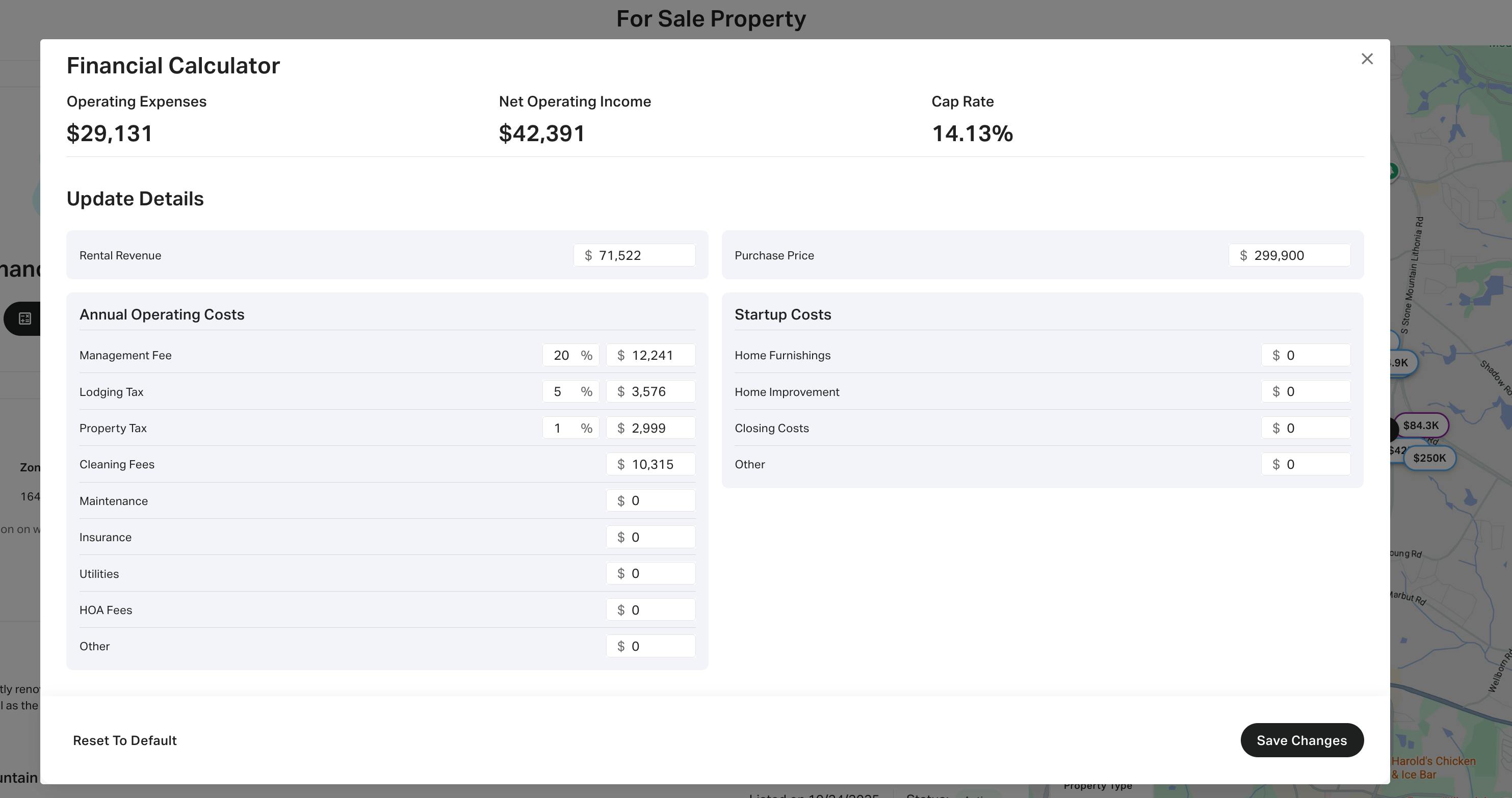
Gross revenue is not profit. Enter your specific costs, including property management fees (typically 20-25%), cleaning fees, utilities, insurance, and maintenance. This step reveals your net operating income (NOI), which is the actual cash flow you can expect from the property.

Subtract your mortgage payments and property taxes from your NOI. If the result is negative, the property may not be profitable as an Airbnb without a larger down payment or higher nightly rates. This final number represents your monthly cash flow before taxes.
-
Verify local short-term rental regulations
-
Confirm HOA allows short-term rentals
-
Check seasonal demand fluctuations
-
Review competitor pricing strategies
Fix common mistakes
Using a generic calculator without adjusting for local realities is the fastest way to overestimate your returns. Most beginners enter a city-wide average occupancy rate and assume their property will perform identically. This ignores the impact of your specific neighborhood, proximity to attractions, and the quality of your listing. If your comps are in a different zip code or have a different amenity profile, your revenue projection is already flawed.
Another frequent error is ignoring dynamic pricing volatility. A static occupancy assumption fails to account for seasonal dips, local events, or market saturation. You must use tools that pull real-time market data, such as AirDNA or Rabbu, to see how rates fluctuate week by week. Relying on annual averages masks the risk of low-demand periods that can erase your profit margins.
Finally, many hosts exclude variable operating costs from their initial calculations. Cleaning fees, restocking supplies, and platform service charges often consume 20–30% of gross revenue. If your calculator does not allow you to input these specific expenses, you are looking at gross income, not net profit. Always subtract these hard costs before deciding if a property is a viable investment.
Airbnb revenue: what to check next
These answers address common objections and misconceptions about using an Airbnb revenue calculator. They clarify how the tools work, what the "rules" actually mean, and what you can realistically expect from a short-term rental investment.
No comments yet. Be the first to share your thoughts!