
Pick the right calculator tool
Choosing a calculator is less about finding a free tool and more about selecting the right data engine. Your ROI projections are only as good as the comp data feeding them. A tool that pulls from outdated listings or ignores local seasonality will give you a false sense of security.
Focus on three criteria: data source transparency, geographic coverage, and pricing structure. Most free tools offer a taste of their data, but reliable long-term analysis often requires a paid subscription to access deeper metrics like seasonal occupancy trends and competitor ADR (Average Daily Rate).
| Tool | Data Source | Coverage | Cost |
|---|---|---|---|
| AirDNA | Real STR comp data | Global | Free trial / Paid |
| Rabbu | Weekly-updated listings | US only | Free |
| BNBCalc | Airbnb & Vrbo data | Global | Free / Paid |
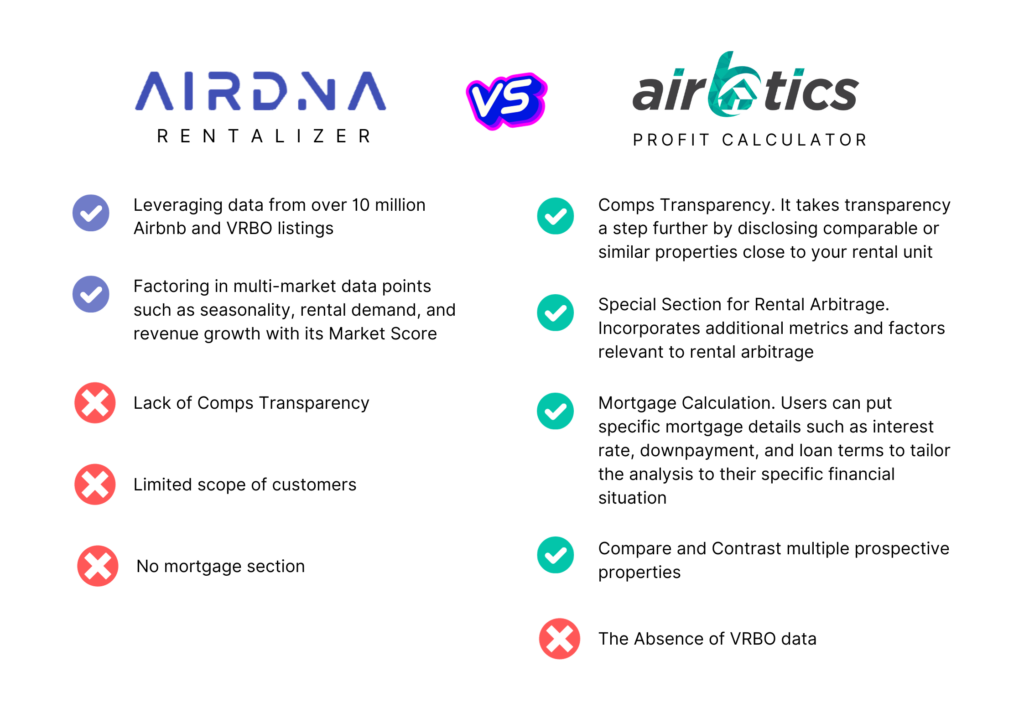
AirDNA is widely considered the industry standard for data accuracy, offering the most granular short-term rental (STR) comp data. It is ideal if you need precise, market-specific insights and are willing to pay for a subscription. For those just starting out or focusing exclusively on the US market, Rabbu offers a robust free alternative with weekly-updated data. BNBCalc sits in the middle, providing a user-friendly interface for both STR and long-term rental (LTR) comparisons.
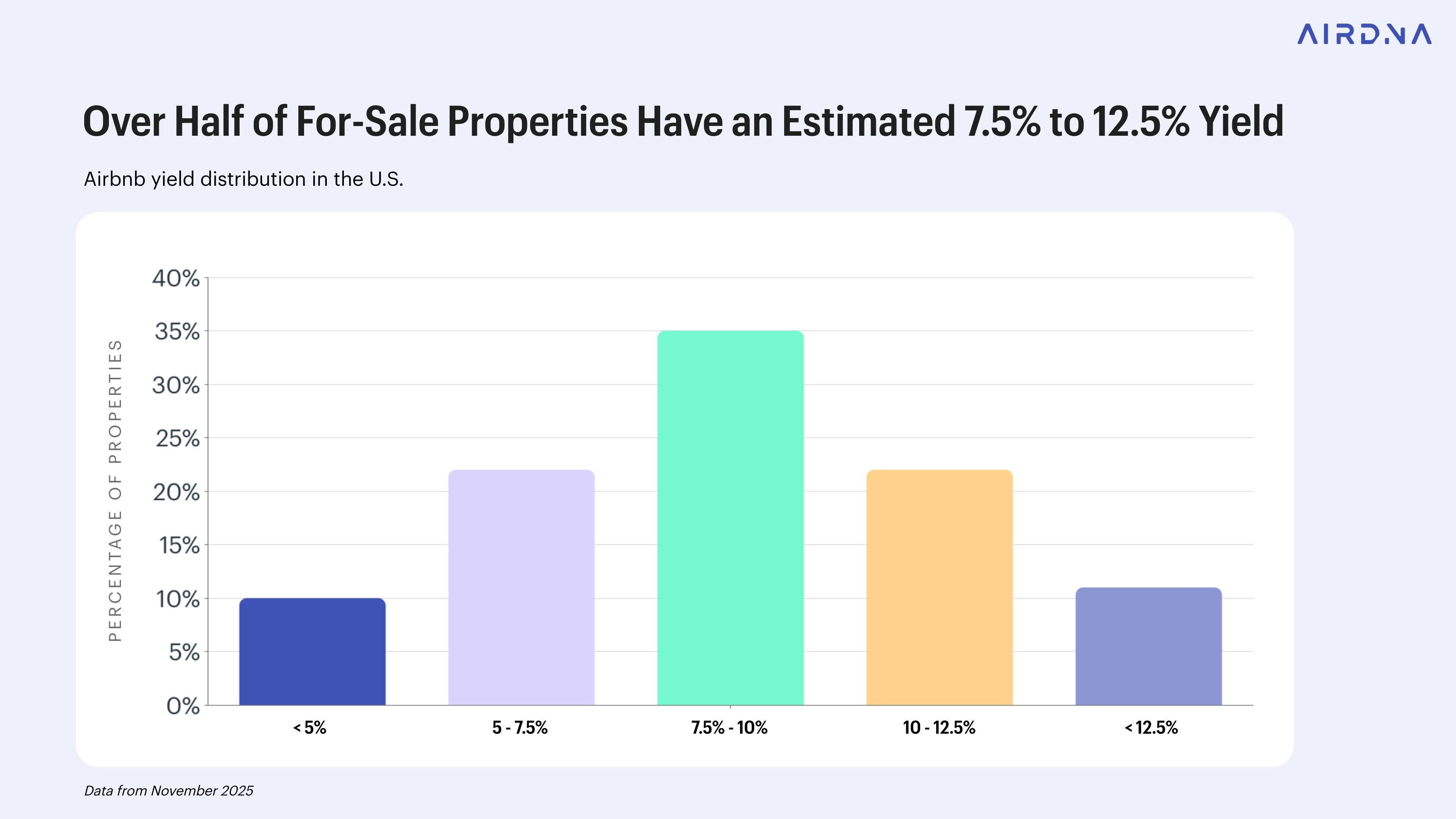
Start by entering your target property address into two or three of these tools. Compare the projected occupancy and ADR numbers. If the variance between tools is large, dig into their data sources. Tools that explicitly state they use real-time booking data or recent transaction records are generally more reliable than those relying on scraped listing pages. This quick cross-check can save you from basing a multi-million dollar investment on flawed assumptions.
Enter property details and location
The accuracy of your Airbnb revenue calculator projections depends entirely on the quality of your input data. Airbnb’s own interactive tool estimates potential monthly host earnings by analyzing geography, listing type, and space configuration against prior booking data in the area. If you feed it vague inputs, you will get vague outputs. Treat this step as the foundation of your entire financial model.
Step 1: Input the exact address
Start by entering the specific street address or neighborhood. Location is the single biggest driver of short-term rental demand and pricing power. A calculator cannot accurately predict occupancy rates for a general city; it needs precise geographic anchors to access local market data, seasonal trends, and regulatory constraints. Even a few miles can mean the difference between a high-demand tourist zone and a quiet residential area with limited booking volume.
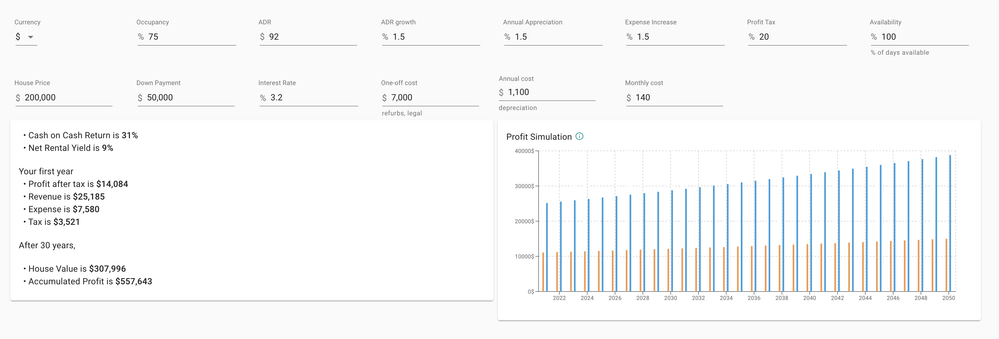
Type the full street address into the location field. If the tool allows neighborhood selection, choose the most specific district available. This ensures the algorithm pulls data from the correct micro-market rather than a broad metropolitan average.
Choose the correct listing category, such as entire home, private room, or shared room. This distinction significantly impacts nightly rates and occupancy expectations. An entire home in a city center commands a different price point than a single room in a shared apartment, and the calculator adjusts its revenue model accordingly.
Enter the number of bedrooms, bathrooms, and maximum guest capacity. These features directly influence the nightly rate multiplier. A three-bedroom house will have a different revenue trajectory than a one-bedroom studio, even in the same location. Be precise here; overestimating capacity can lead to inflated revenue projections that don’t match market reality.

Review and confirm the amenities included in the listing, such as Wi-Fi, kitchen access, parking, or pools. While basic amenities are standard, premium features can justify higher nightly rates. The calculator uses this data to benchmark your property against similar listings in the area, refining the estimated income potential.
Step 2: Validate your inputs
Before moving to the financial assumptions, double-check every field. A common mistake is selecting the wrong property type or underestimating the number of bedrooms. These errors compound, leading to revenue projections that are either overly optimistic or pessimistic. Ensure the location matches the actual property, not just the owner’s residence. Once you are confident in these details, the calculator can begin generating a reliable ROI estimate based on real market comparables.
Adjust occupancy and daily rate inputs
Default settings in most calculators are built for average markets, not your specific neighborhood. If you leave the occupancy rate and Average Daily Rate (ADR) at their defaults, you will likely overestimate your potential income. Refining these numbers is the most critical step in getting an accurate ROI projection.
Start by adjusting the occupancy rate. Most tools default to 70–80%, which assumes a high-demand, low-seasonality market. In reality, most hosts see significant dips during off-peak months. If your property is in a seasonal area (like a ski town or beach destination), lower the annual average to reflect those quiet weeks. A more realistic baseline for many non-tourist-heavy areas is closer to 50–60%.
Next, set your Average Daily Rate (ADR). This is your expected nightly price before fees. Do not just pick a number from the top of the Airbnb search results. Look at the "superhost" listings in your immediate vicinity that offer similar amenities. Their rates are usually the true market ceiling for well-managed properties. If you are just starting out, you might price slightly lower to attract initial reviews, but your calculator should reflect your long-term target rate.
Once you have these two inputs, the calculator multiplies them to show your gross monthly revenue. This simple multiplication—occupancy rate times daily rate—is the foundation of your income estimate. From there, you can subtract expenses to see the true net profit. If the result seems too good to be true, revisit your ADR or occupancy assumptions; you likely set them too optimistically.
Subtract operating costs and fees
Gross revenue is just the starting line. If you plan your ROI based on what guests pay without accounting for the bills that come with hosting, you will overestimate your returns. To get an accurate Airbnb revenue calculator projection, you must subtract every recurring expense from that gross number.
Start by entering your cleaning fees. This is often the largest variable cost. Whether you hire a professional service or do it yourself, you need to account for laundry, supplies, and labor time. Next, input your management fees. If you use a property management company, they typically charge 20% to 30% of the booking total. If you manage the property yourself, consider imputing a value for your time to see the true net profit.
Don't forget utilities and taxes. Many short-term rentals pass electricity, water, and internet costs to guests, but if you cover them, these expenses eat directly into your margin. You must also factor in local occupancy taxes and transient lodging taxes. These are often withheld automatically by platforms like Airbnb, but if you handle them manually, they are a mandatory deduction from your take-home pay.
-
Cleaning and laundry costs
-
Property management fees (if applicable)
-
Utilities (electricity, water, internet)
-
Local occupancy and lodging taxes
-
Insurance premiums
-
Maintenance and repair fund
Once you subtract these line items, the remaining figure is your net operating income. This is the number that matters for calculating your actual return on investment. Be honest about your costs; underestimating expenses is the most common mistake new hosts make when using an Airbnb revenue calculator.
Validate Against Local Comps
Your calculator output is a projection, not a guarantee. To sanity-check the numbers, you need to compare them against actual performance data from comparable listings in your neighborhood. This step confirms whether your assumptions about occupancy and daily rates align with market reality.
Start by pulling up a reputable short-term rental analytics platform. Tools like AirDNA or RedAwning provide access to real-world data from thousands of managed properties. Enter your specific address or neighborhood to see how similar units are performing right now.
Look for three key metrics in the comparable data:
- Occupancy Rate: Does your calculator assume 70% occupancy, but the local average for 2-bedroom units is only 55%? If so, your revenue estimate is likely inflated.
- Average Daily Rate (ADR): Check if your projected nightly rate matches what guests are actually paying for similar amenities and locations.
- Seasonality: Ensure the calculator’s seasonal adjustments reflect local trends, such as summer peaks or winter lulls specific to your city.
If your calculator’s output deviates significantly from these local benchmarks, adjust your inputs. A 10-15% variance is normal, but larger gaps suggest your initial assumptions need recalibration.
Common calculation errors to avoid
Even with a reliable Airbnb revenue calculator, small input mistakes can distort your ROI projection. These errors don’t just lower your estimated profit—they can lead you to buy a property that barely breaks even or loses money once real-world conditions hit.
Ignoring vacancy seasonality
Many users enter a flat vacancy rate, such as 20%, across all months. This smooths out the natural peaks and valleys of short-term rental demand. A beach house might be fully booked in July but sit empty for weeks in November. If your calculator doesn’t account for this fluctuation, you’ll overestimate annual revenue. Adjust your input to reflect actual seasonal trends for your specific location.
Double-counting management fees
It’s easy to accidentally apply management costs twice. You might input a 20% management fee in the expense section and then also see a “platform fee” or “cleaning fee” deducted from your gross revenue. Ensure you’re only counting the management percentage once. If the calculator automatically deducts platform fees, do not add them again in the manual expense field. Consistency here keeps your net operating income accurate.
Using outdated market data
Short-term rental markets shift quickly. A calculator pulling data from six months ago might miss a new competitor opening next door or a sudden drop in local tourism. Always verify that the calculator is using current, up-to-date pricing and occupancy data. Tools like PriceLabs provide dynamic, data-backed projections that adjust for recent market changes, helping you avoid relying on stale numbers.
Frequently asked questions about Airbnb calculators
How accurate are Airbnb revenue projections?
Calculators provide estimates, not guarantees. They rely on historical booking data from comparable properties in your area to project occupancy and average daily rates. While tools like AirDNA and BNB Calc use real STR comp data, actual earnings depend on your specific marketing, pricing strategy, and local demand fluctuations. Treat these numbers as a baseline for feasibility, not a fixed income promise.
What data sources do these calculators use?
Most reputable calculators pull from aggregated booking data across platforms like Airbnb and Vrbo. For example, Airbnb’s own interactive tool factors in prior booking data in the area to estimate potential monthly earnings. Other tools, such as PriceLabs or Rabbu, update their data weekly to reflect current market trends. Always check if the calculator specifies its data freshness, as stale data leads to inaccurate ROI predictions.
How do I interpret the ROI percentage?
ROI (Return on Investment) compares your projected net profit against your total initial costs, including purchase price, renovations, and furniture. A higher percentage indicates a better return relative to your capital. However, don’t rely on gross revenue figures alone. Ensure the calculator accounts for operating expenses like cleaning fees, platform commissions, utilities, and maintenance to get a realistic net profit figure.
Can I use these calculators for long-term rentals?
Yes, but with caution. Some calculators, like BNB Calc, offer options to project long-term rental revenue. However, short-term rental dynamics—such as seasonal occupancy spikes and higher management intensity—differ significantly from long-term leases. If you’re comparing STR vs. LTR, ensure the calculator allows you to adjust for vacancy rates and management time specific to short-term stays.
Do I need to pay for a premium calculator?
Many free calculators provide sufficient data for initial feasibility checks. Tools like AirDNA and PriceLabs offer free tiers that allow you to enter an address and get projected revenue. Premium versions typically add deeper market analysis, competitor benchmarking, and dynamic pricing recommendations. Start with the free version to screen properties; upgrade only if you need granular data for a serious investment decision.
No comments yet. Be the first to share your thoughts!