
Input property details and location
An Airbnb revenue calculator is only as reliable as the data you feed it. Before adjusting occupancy rates or calculating expenses, you must establish a precise baseline by entering granular property attributes. This section guides you through the initial input phase to ensure your ROI projections reflect actual market conditions rather than generic estimates.
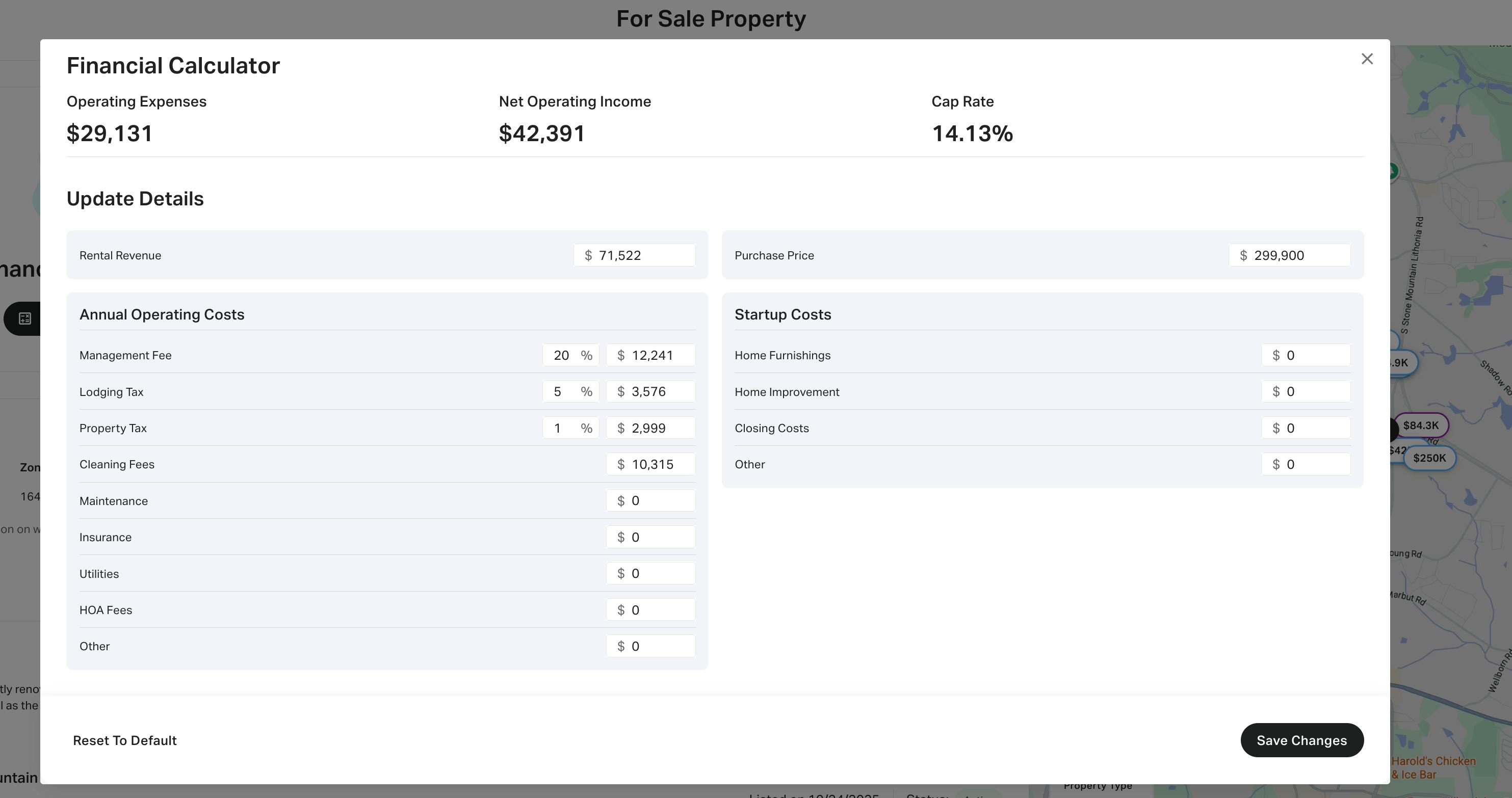
Begin by inputting the specific street address into the calculator’s search field. Platforms like AirDNA and BNB Calc use geospatial data to pull comparable short-term rental (STR) performance metrics from your immediate neighborhood. Avoid using city names or zip codes alone, as revenue potential varies significantly between blocks. The tool will then anchor its projections to real-world transaction data for that exact location.
Accurately define the property’s configuration by selecting the correct unit type (e.g., entire home, private room, or shared room) and specifying the number of bedrooms and bathrooms. This step is critical because guest demand and average daily rates differ sharply between a studio and a three-bedroom house. Misidentifying the unit type will skew the calculator’s comparison against irrelevant competitors, leading to inaccurate revenue forecasts.

Input specific amenities that drive premium pricing, such as pools, hot tubs, or dedicated workspaces. Most calculators allow you to toggle these features on or off to see their marginal impact on occupancy and nightly rates. Be honest about the property’s condition; luxury finishes command higher rates, while dated interiors may suppress revenue despite strong location metrics. This granular adjustment ensures the calculator models your specific asset, not a generic average.
Once these core details are entered, the calculator generates a preliminary revenue projection based on local supply and demand dynamics. Verify that the generated metrics align with your expectations for the area. If the baseline seems off, revisit the address or unit configuration before moving to expense calculations. Precision at this stage prevents compounding errors in your final ROI assessment.
Adjust occupancy and daily rate assumptions
Default market averages in an Airbnb revenue calculator are statistical means, not guarantees. Relying on these baseline figures often inflates projected cash flow because they include high-performing outliers. To calculate accurate ROI, you must replace generic market data with property-specific conservative estimates.
1. Input local occupancy and ADR
Start by identifying the Average Daily Rate (ADR) and occupancy rate for your specific zip code or neighborhood, not just the city-wide average. Tools like Rabbu or Airbtics provide weekly-updated local data, but these are still aggregates. You must manually input the specific metrics for a comparable property (comp) that matches your unit’s size, amenities, and location quality. If your property lacks premium amenities like a pool or dedicated workspace, reduce the default ADR by 10-15% to reflect its actual market position.
2. Apply conservative occupancy buffers
Market averages often assume 70-80% occupancy. For a new listing or a property in a seasonal market, this is financially risky. Reduce the assumed occupancy rate by 10-20% to account for vacancy gaps, maintenance downtime, and platform algorithm changes. For example, if the local average is 75%, input 60-65% into your calculator. This buffer ensures your revenue projections remain viable even during slower booking periods.
3. Validate against adjusted scenarios
Compare your refined inputs against the default market assumptions to see the impact on net operating income. A small difference in daily rate or occupancy compounds significantly over a year. Use a comparison table to visualize the gap between optimistic and conservative scenarios, ensuring your ROI calculation is based on sustainable, not peak, performance.
By grounding your assumptions in conservative, property-specific data, you eliminate the risk of over-leveraging on unrealistic revenue projections. This adjustment process transforms the calculator from a generic estimator into a precise financial planning tool.
Subtract operating expenses and taxes
Gross revenue is not profit. To derive true Net Operating Income (NOI) from your Airbnb revenue calculator, you must subtract every recurring cost from the projected income. This step isolates the actual cash flow available to the owner, distinguishing between top-line earnings and bottom-line yield.
Input fixed and variable costs
Begin by entering all fixed expenses that occur regardless of occupancy. These include property taxes, insurance premiums, HOA fees, and mortgage interest. Next, input variable costs tied directly to guest stays. These typically include cleaning fees paid to staff, linen laundry services, and utilities such as electricity and water. Most calculators allow you to set these as a flat monthly fee or a per-stay amount; choose the model that matches your local vendor contracts.
Account for management and platform fees
Platform commissions and management costs are significant drains on net yield. Airbnb and Vrbo charge service fees that can total 14–16% of the booking subtotal. If you use a property management company, add their percentage—usually 20–30% of gross revenue—into the expense field. Failure to include these fees results in an inflated ROI projection that does not reflect reality. Treat these as non-negotiable line items in your spreadsheet.
Apply local tax rates
Local occupancy taxes vary by jurisdiction and are often overlooked in initial projections. Some municipalities charge transient occupancy taxes (TOT) or short-term rental permits that must be remitted to the city or state. Enter these as a percentage of gross revenue. Since these are pass-through costs, they reduce your net cash flow but do not necessarily impact your taxable income in the same way as operating expenses. Verify the current rate with your local tax authority to ensure accuracy.
Validate against net operating income
Once all expenses are entered, the calculator should output your Net Operating Income (NOI). Compare this figure against your initial investment to calculate your cash-on-cash return. If the projected NOI is negative or yields less than your alternative investment opportunities, the property may not be viable. Use this validated number to adjust your pricing strategy or occupancy targets before committing capital.
Validate projections against local comps
Algorithmic revenue calculators provide a baseline, but they rely on historical averages that may not reflect current market volatility. To ensure your ROI calculations are accurate, you must cross-reference the tool’s output with actual comparable listings in your specific neighborhood. This manual verification step prevents overestimating income based on inflated seasonal peaks or outdated occupancy rates.
Input your property details
Begin by entering your specific address into the calculator. Most robust tools, such as AirDNA, use this location to pull data from nearby short-term rental transactions. Ensure the property type, bedroom count, and amenities match your actual listing to narrow the data set to relevant comparables.
Adjust for unique variables
Raw calculator outputs often ignore unique property features that drive premium pricing. If your listing offers a hot tub, dedicated workspace, or pet-friendly policies, manually adjust the projected Average Daily Rate (ADR) upward. Conversely, if your property lacks parking or has a steep staircase, reduce the projected occupancy rate to account for guest friction.
Subtract realistic expenses
Gross revenue projections are misleading without expense deductions. Subtract fixed costs such as mortgage interest, property taxes, and insurance. Then, deduct variable operating expenses, including cleaning fees, utilities, and platform service fees. Industry data suggests that operating expenses typically consume 25% to 35% of gross revenue, depending on the level of host involvement.
Verify against active listings
The final validation step is to search for three to five active listings in your immediate vicinity that match your property profile. Compare their actual nightly rates and review counts against your calculator’s ADR and occupancy estimates. If the calculator projects a 75% occupancy rate but comparable listings are showing 60% or lower, adjust your financial model downward to reflect the true market demand.
Avoid common calculation errors
Even the most sophisticated Airbnb revenue calculator can produce misleading ROI figures if the underlying assumptions are flawed. Small mechanical errors in input or logic compound quickly, turning a promising investment into a financial drain. To ensure accuracy, you must systematically audit your inputs, adjust for market realities, subtract all hidden costs, and validate the final output against independent benchmarks.
Ignoring Seasonality and Occupancy Swings
Many users default to a flat, year-round occupancy rate, such as 70%, which rarely reflects reality. Short-term rental markets are inherently cyclical. A property in a beach town might operate at 95% occupancy in July and drop to 30% in November. Using a static average smooths out these critical dips, inflating your projected net operating income.
Instead, input month-by-month occupancy and average daily rate projections. If your calculator does not support granular seasonality, apply a conservative discount factor to your peak-month revenue estimates. This adjustment accounts for the inevitable vacancy gaps that occur between high-demand periods.
Double-Counting Fees and Expenses
A frequent error occurs when users manually add cleaning fees to the gross revenue while the calculator already includes them in its revenue projection model. Similarly, some platforms embed property management fees (typically 20-25%) into the "net" output, while others present it as a gross figure requiring manual subtraction.
Before running the calculation, verify the calculator’s definition of "revenue" and "expenses." If the tool pulls data from Airbnb’s API, it may already exclude platform service fees. Manually deducting these again will artificially depress your ROI. Create a simple checklist of all expense categories—cleaning, utilities, insurance, maintenance, and management—to ensure each line item is accounted for exactly once.
Overlooking Local Regulatory Costs
Standard calculators often treat a property as a generic asset, ignoring the specific friction of local short-term rental regulations. Many jurisdictions impose transient occupancy taxes, licensing fees, or strict zoning restrictions that limit rental days. These are not optional expenses; they are fixed operational costs that directly reduce your cash flow.
If your calculator does not have a dedicated field for local permits or taxes, add a manual line item for these costs. For example, if your city charges a 12% transient occupancy tax, ensure your net revenue calculation reflects this deduction. Failure to account for regulatory compliance costs can erase your entire profit margin in high-regulation markets.
Final verification before purchase
Before committing capital, treat the calculator output as a hypothesis, not a guarantee. Run the numbers through a final stress test to ensure the investment thesis holds under realistic conditions. This checklist isolates variables that often distort ROI projections.
Input Validation
Verify that all inputs reflect current market data rather than optimistic averages. Cross-reference occupancy rates and Average Daily Rates (ADR) against official STR market reports or primary sources like Rabbu’s weekly-updated data. Do not rely on static historical averages; adjust for seasonality and local regulatory changes.
Expense Subtraction
Subtract all hard and soft costs from the gross revenue. Include property management fees (typically 20-25%), cleaning, maintenance, utilities, insurance, and platform commissions. Many calculators omit variable costs like supplies and repairs, which can erode net operating income by 10-15%. Ensure your expense ratio aligns with local market standards.
ROI Stress Test
Reduce occupancy by 20% and increase expenses by 10% to simulate a downturn. If the property still meets your minimum cash-on-cash return threshold, the investment is resilient. If the margin disappears, the deal is likely over-leveraged or dependent on unrealistic growth assumptions. Document these scenarios for your due diligence file.
Final Approval
Confirm that the net profit justifies the opportunity cost of capital. Compare the STR ROI against alternative investments like REITs or bonds. If the risk-adjusted return is not superior, reconsider the purchase. A positive cash flow in a base case is insufficient; you need a buffer for market volatility.
No comments yet. Be the first to share your thoughts!